
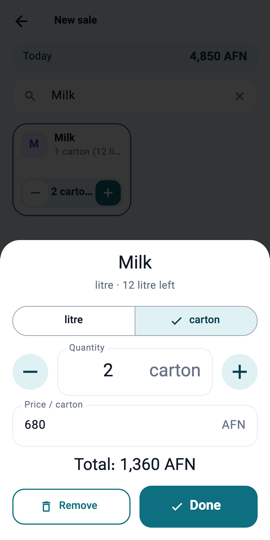
Selling by the pack 1Step 1In Items, open an item and switch on Also sold in packs: type the pack size and the price per pack. When selling, tap the line and choose Carton or Sack. Stock is shown both ways.
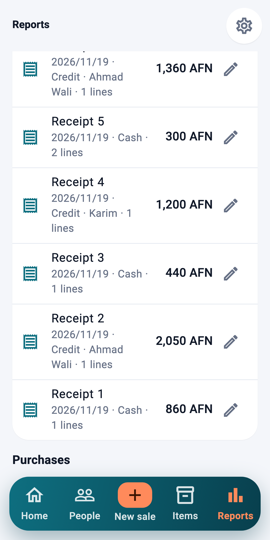
The pencil beside a receipt 2Step 2Made a mistake? In Reports every receipt has a pencil beside it for 7 days. Tap it.
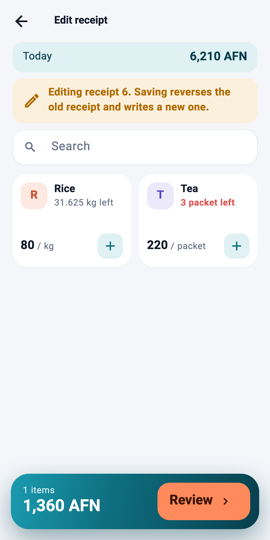
Editing a receipt 3Step 3The sale page opens with the same goods. Correct it and save: the old receipt is reversed and a new one is written. Nothing is erased.
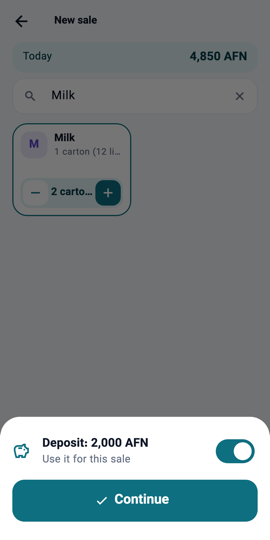
Using a deposit 4Step 4A customer pays ahead? On their page tap Deposit. At their next credit sale the app asks whether to use the deposit, and works out what is left by itself.
What you will see Stock shown as "4 cartons + 5 pieces", a receipt that says "replaced by receipt …", and on a customer's page a "Net" line that says who owes whom in the end.