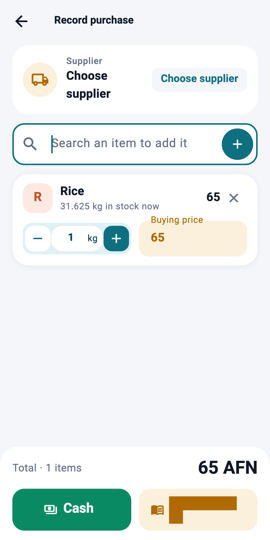
Purchase: the supplier card 1Step 1Open Items and tap Record purchase. Choose the supplier at the top, or add a new one.
Search and add lines 2Step 2Search an item by name and tap it to add a line. An item that is not in your list yet can be added right here.
Quantity and buying price 3Step 3Set the quantity and the buying price for each line. The price you type becomes the item's new buying price.
Cash or on credit 4Step 4Finish with Cash or Credit. Credit records what you owe the supplier on their page; stock goes up for items that are counted.
What you will see On Items, the stock of the bought items is higher; on People, the supplier shows under "I owe" if you bought on credit.