
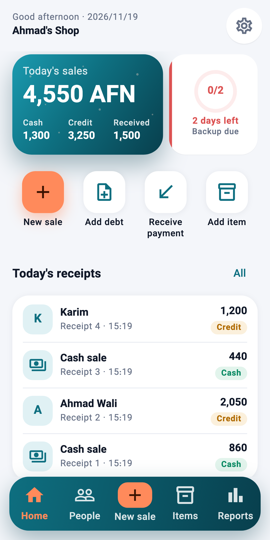
Home: the four everyday actions 1Step 1On Home, tap the coral New sale button. It is also the + in the middle of the bottom bar.
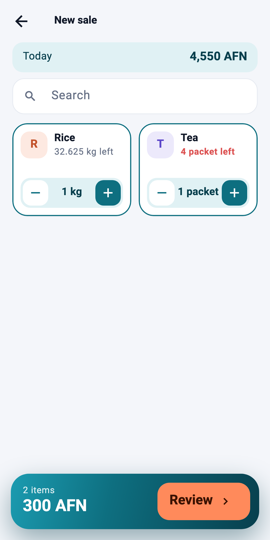
New sale: tap items to add them 2Step 2Tap the items the customer buys. Each tap adds one; use − and + on the card to change the quantity, or type it for weights like 2.5 kg.
The Review button 3Step 3Tap Review to check the receipt: items, quantities, prices and the total.
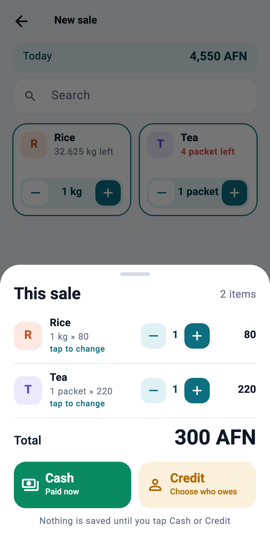
Check the receipt, then Cash or Credit 4Step 4Tap Cash. The sale is saved and gets a receipt number.
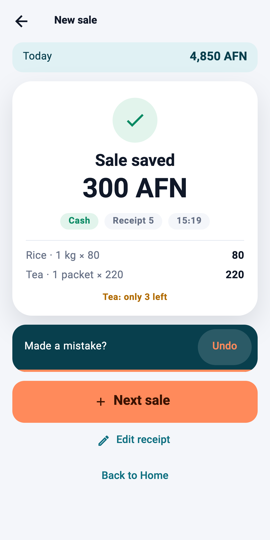
Sale saved 5Step 5The Sale saved page shows the receipt. Tap Back to home; the sale is now on today's receipts and in today's total.
What you will see Today's sales on Home go up by the sale's total, and the receipt is the first line under Today's receipts.